
Best email marketing platforms In 2027
Published on October 16, 2026/Last edited on October 16, 2026/32 min read

Team Braze
BrazeThe best email marketing platforms in 2027 depend on the needs and goals of your business. Braze suits consumer brands sending deeply personalized, real-time email at volume, Klaviyo is built for ecommerce and direct-to-consumer and Mailchimp works for small businesses with straightforward sends.
Hubspot fits teams running email alongside a CRM, Brevo serves growing businesses on a budget and ActiveCampaign handles sales and marketing automation together. Salesforce and Adobe are aimed at organizations already standardized on those ecosystems, Iterable covers multi-brand retail and media and Customer.io is built for product led and developer-heavy teams.
This comparison of email marketing platforms looks at send volume, personalization depth, deliverability control and how much of the program is automated rather than size of the business.
TL:DR
- There's no single right platform, only the one that fits how you send. Match it to your volume, your personalization needs, how much deliverability control you want and how much of the program you expect to run automatically.
- Authentication is no longer a differentiator. Google, Yahoo and Microsoft all require SPF, DKIM and DMARC from bulk senders, so judge platforms on IP warming, inbox placement monitoring and whether real people help when something breaks.
- Understand the vendor’s AI capabilities. Generative AI writes subject lines and copy, while action optimization decides who receives what and when. Vendors sometimes lump both under one heading.
- Pricing units matter more than headline prices. Mailchimp charges by contacts, Klaviyo by active profiles, Brevo by emails sent and Braze by monthly active users, so the cheapest entry tier is rarely the cheapest at your volume.
- Email-only is the right architecture for some businesses but it’s worth asking what happens if you need other channels in the future.
What is an email marketing platform?
An email marketing platform is software a business uses to run its email program. A single system deals with everything, from the moment someone subscribes, to the reporting, and analysis after sending. That includes managing subscriber lists, message creation, audience segmentation, automated and triggered sending, deliverability management, sending infrastructure and performance reporting.
A marketing automation tool is organized around lead workflows, fed by sources across the business, with email as one step inside them. Email marketing platforms are organized around email itself. Some run other channels too, with varying degrees of coordination between them.
Since 2025, there have been changes in email marketing that brands need to consider when choosing a platform. Mailbox providers have now made authentication a condition of delivery. Google, Yahoo and Microsoft now require SPF, DKIM and DMARC authentication if you're sending more than 5,000 messages a day to personal accounts. Sending has moved from batch to behaviour-triggered too, so how quickly a platform responds to an event is important. And AI can now choose audience and timing, not just assist with subject lines and copy.
What to look for in the best email marketing software
Most platforms claim similar features, but whether you’re sending out thousands or millions of emails each year, you need more than a few good features. Here are the capabilities that will help you determine whether a platform can carry you through the busiest weeks in your calendar and support your growth.
Message creation and template flexibility
Look for simple drag-and-drop email builders with reusable content blocks, HTML access and preview testing in dark mode so that you can see how the email renders across different email providers.
What to ask for in a demo: Ask them to build a new email from an existing template, from start to finish, including the quality assurance. Time it, because this is what your team will be dealing with day-to-day.
Audience segmentation depth
Segmentation should reach across behavioral, transactional and engagement attributes and update on their own as behavior changes. You should be able to build segments without the need of a developer.
What to ask for in a demo: Ask for how long a segment takes to build, recalculate and what happens when you add more filters.
Experimentation
Look for testing that goes beyond subject lines. You should be able to test content, send times, and audiences, and run multivariate tests when you want to change more than one element at once. Results should also be easy to read without a data analyst, with clear reporting on whether a difference is statistically significant or just noise. The best platforms let you test across a whole journey, not just a single send, so you can learn which sequence works and not only which email.
What to ask for in a demo: Ask them to set up a subject line and email body test with at least 3 variants for each. Watch how long it takes, and ask how the platform decides a winner and how it shows you the result is statistically significant.
Automation and triggering
Look for triggered and transactional email sending that can respond the moment someone’s behavior changes, like abandoning a cart or finishing onboarding, and also carry out scheduled sends.
What to ask for in a demo: Ask how long it takes for an email to go out after a customer acts. Some platforms take seconds, others wait for a new cycle.
Deliverability infrastructure
Mailbox providers now enforce authentication, so look past that and treat it as the bare minimum. Ask if you get a dedicated IP or shared pool and who handles IP warming. A dedicated IP gives you a reputation that’s yours alone, but needs a steady volume to build one, so a well-run shared pool is often better below a certain send size. Warming is crucial when you’re migrating as a new IP has no send history and volume has to be raised gradually over time. Some platforms will give you instructions for this, or might have tools for automated warming, and others will run it for you. Inbox
placement, sender reputation, bounces, and complaint rates are also good to have visibility of, so check if you can see them in the platform or whether you need a separate tool.
What to ask for in a demo: Ask what happens and who you talk to if your domain lands on a blocklist. Some platforms have deliverability specialists who diagnose the problem and help you fix it. Ask how quickly that support kicks in.
AI capability
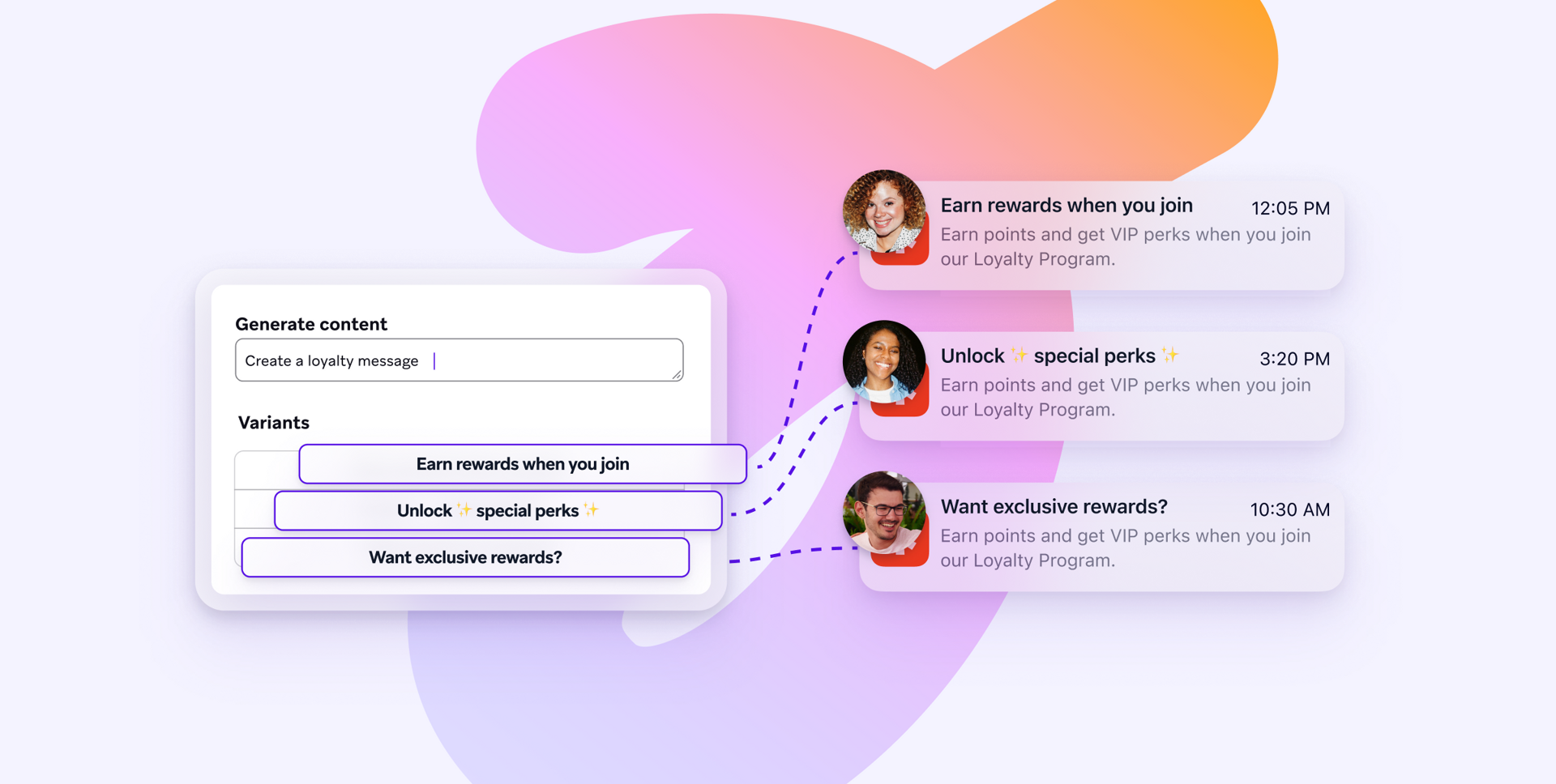
AI capability can be split into content generation and audience, timing and message selection. Content generation writes and designs subject lines, body copy, imagery and variants at volume. Action optimization decides who gets to see what, and learns from how people respond.
What to ask for in a demo: Ask to see each type of AI capability separately as they often get packaged together but have very different jobs.
Data integration
Email personalization will only be as relevant as your unified data. Check for native connections to your data warehouse, commerce platform and any other customer data tooling. Find out whether data flows both ways or only inbound and how often it updates, as this will greatly affect how you can respond to your audience in the moment.
What to ask for in a demo: Ask if you can connect data points and use them without any engineering help. That will show you how quickly you can build.
Reporting depth and flexibility
Open rates are an unreliable indicator on their own, so look for flexible, customizable reporting that connects sends to business outcomes, like revenue per campaign, conversion by segment and performance across a whole journey. Check that attribution windows can be matched with how the rest of your business reports so that there is no confusion about any of the financial numbers.
What to ask for in a demo: Ask to build a custom report on a key metric important to your business to gauge how easy it is to build customizable reports. Ask whether the platform can run holdout groups. This is a portion of your audience you deliberately don’t send anything to, so you can compare them against the people you did, and better understand the impact of your emails.
Scale and reliability
A platform can hold millions of subscribers and still take hours to reach them all, so scale and reliability go hand in hand. Understand what the throughput is — how many messages a platform can send in a given timeframe.
What to ask for in a demo: Ask what uptime looked like during a busy period like Black Friday.
The best email marketing platforms in 2027
The best email marketing platform for your business is the one that fits your business needs the best. The list of platforms below isn’t a ranking — there are no scores, but we’ve looked closely at email capacity, pricing and what sets them apart.
Email marketing platform comparison
Braze
Braze is a customer engagement platform built on real-time first-party data, used by consumer brands across retail, ecommerce, media, travel, financial services and food services. Braze email runs on the same live customer profile the rest of the platform uses, so messages can reflect in-the-moment behavior and decisions. Other channels are available alongside email, though there is nothing that requires you to use them.
Email capability: Emails can be built in a drag-and-drop editor, in HTML, or through native Figma and Canva integrations with reusable content blocks, and where you can pull across designs without having to start from scratch each time. Braze Email Creative Services is an additional service that can provide customized, inbox-ready email templates. Inbox Vision allows for spam testing and cross-client previews before a send goes out. Sends trigger on customer behavior in real time, and content can be personalized at send or at open, pulling live product data, pricing or recommendations into the message as it's read. Segmentation runs on more than 100 out-of-the-box filters or a SQL composer for anything more specific. Throughput holds up during peak retail periods. On deliverability, Braze provides automated IP warming, a Deliverability Center that integrates with Google Postmaster Tools and Microsoft SNDS, and an in-house team of deliverability specialists who work directly with customers on warming plans and inbox placement. AI capabilities are embedded throughout the marketer’s workflow: BrazeAI™ handles content generation, segmentation, experimentation, while BrazeAI Decisioning Studio™ selects the message, timing, and creative for each individual.
Best for: Consumer brands running high-volume personalized email programs where real-time communications are critical.
Pricing: Braze has four platform editions, starting with Braze Go for early-stage growth teams and running through to Select, Pro and Enterprise. Pricing scales with monthly active users, so you don’t pay for dormant profiles. Action Credits cover channel volume and BrazeAI™ usage. Email is included in every edition and there’s a free trial.
Key differentiator: Individual-level decisioning in real-time. Braze chooses the message, creative, timing and offer for each person on a 1:1 basis and keeps adjusting as they respond.
Further reading: Braze in The Forrester Wave™: Email Marketing Service Providers, Q1 2026
Klaviyo
Klaviyo is a B2C CRM for ecommerce and direct-to-consumer brands. Customer data sits at the heart of it with more than 350 integrations pulling store, browsing and purchase history into one profile that email, SMS, mobile push, WhatsApp and social all read from.
Email capability: Emails are built in a drag-and-drop editor with more than 160 customizable templates and AI can generate on-brand templates and subject lines. Segmentation runs on any data point held in the Klaviyo Data Platform and product recommendations can be added to emails based on past behavior, like browsing history and past purchases. Send-time optimization happens with Smart Send Time, which delivers each email when someone is most likely to engage. AI can pick the winning version for each subscriber and a reputation repair feature can restore sending reputation automatically. Flows, Klaviyo's automation builder, sends email and SMS off customer data and real-time behavior, with Flows AI for building them faster.
Best for: Ecommerce and direct-to-consumer brands.
Pricing: A free plan covers up to 250 active profiles and 500 email sends a month, with the drag-and-drop editor, automations, segmentation and reporting included. Exceeding these limits means upgrading or pausing sends. Paid plans start at $60 a month priced for active profiles and the platform is sold in modules, with marketing, data and analytics, service and the AI agents each priced separately.
Key differentiator: The built-in customer data platform and depth of ecommerce integrations, which pull purchase and browsing data straight into emails for product-level personalization.
Mailchimp
Mailchimp is an email marketing and automation platform aimed at small and growing businesses that want to send well-designed campaigns without a specialist team. It covers email, SMS as a paid add-on, landing pages, and reporting, with more than 300 integrations connecting stores and other tools.
Email capability: A drag-and-drop editor with more than 130 templates, plus segmentation on behavior and purchase history and more than 50 behavior-based triggers for personalization. Marketing Automation Flows handle welcome, abandoned cart, and re-engagement sequences, with up to 200 flows on Standard and Premium and up to four flow steps on Essentials. Intuit Assist drafts headlines, body copy, and complete emails, and AI-powered product recommendations pull best sellers and new arrivals into dynamic content blocks. Predictive segmentation and behavioral targeting are limited to Standard and Premium.
Best for: Small businesses and straightforward sends.
Pricing: Priced by contact count across four tiers. Free covers up to 250 contacts and 500 emails a month. Essentials starts at $13 a month, Standard at $20, and Premium at $350, with monthly send allowances of 10, 12, and 15 times your contact count. Above 200,000 contacts, pricing moves to a high-volume plan arranged with sales.
Key differentiator: Ease of use and the breadth of the integration library, which makes it quick to connect a store and start sending without technical setup.
HubSpot
HubSpot is a customer platform that runs marketing, sales, and service on one shared CRM record, with more than 306,000 customers across 135 countries. Marketing teams work in Marketing Hub, and email sits on the same contact record as the sales pipeline rather than in a separate system.
Email capability: A drag-and-drop editor with goal-based templates, plus AI that generates emails from a prompt and rewrites or adjusts the tone of existing copy. Personalization pulls from CRM fields including contact name, company, lifecycle stage, and list membership, and automation workflows trigger follow-ups based on opens, bounces, and clicks. A/B testing and smart content are limited to paid tiers, while send time optimization, programmable email using CRM object data, and email approvals sit higher up the range. Multi-touch revenue attribution is Enterprise only.
Best for: Teams running email alongside a CRM.
Pricing: Free tools cover 2,000 email sends a month with HubSpot branding. Marketing Hub Starter starts at $20 a month per seat, Professional at $890, and Enterprise at $3,600, with send limits of 5, 10, and 20 times your marketing contact tier. Professional and Enterprise also carry mandatory one-time onboarding fees of $3,000 and $7,000.
Key differentiator: Email runs on the same record as sales and service, so contact data, lead handoff, and pipeline reporting stay connected in a way a standalone email platform doesn't match.
Brevo
Brevo is a marketing and sales platform used by more than 600,000 customers, spanning email, SMS, WhatsApp, web and mobile push, live chat, and a sales pipeline. Billing is tied to emails sent rather than list size, which suits a large list that gets mailed selectively.
Email capability: A drag-and-drop editor with responsive templates, plus AI for subject lines and body copy. Segmentation filters on demographics, website activity, campaign engagement, and custom events, with dynamic lists that update as subscriber behavior changes. Ready-made workflows cover welcome, birthday, and abandoned cart sequences, and predictive sending on Standard and above optimizes send time per recipient. Brevo reports a 99% delivery rate. Advanced reporting adds click heatmaps plus geography and device breakdowns, and transactional email through SMTP and API is included on every plan.
Best for: Growing businesses on a budget.
Pricing: A free plan covers 300 emails a day, with paid tiers from $9 a month for 5,000 emails, rising to Professional from $499 and a custom-priced Enterprise tier. Paying yearly takes 10% off. Removing Brevo branding from your emails is a paid add-on on the entry tier.
Key differentiator: Breadth of channels at an accessible price, with billing tied to sends rather than contacts stored.
ActiveCampaign
ActiveCampaign is a marketing automation platform with a built-in CRM, used by more than 180,000 businesses. It runs email alongside WhatsApp, SMS, and transactional email as add-ons, and the platform is built around Active Intelligence, its AI layer for creating and optimizing campaigns.
Email capability: A drag-and-drop designer for plain text and HTML with more than 250 pre-built templates, plus AI content and image generation, an AI campaign builder, and brand kits for keeping output on-brand. Automation runs on more than 950 recipes with unlimited actions on most tiers, though Starter caps at five actions per automation. Segmentation is tiered as Limited, Standard, Advanced, and Premium depending on plan, and higher tiers add conditional content and predictive sending. Spam check and inbox preview testing are included, capped at five previews a month on Plus and Pro and unlimited on Enterprise. ActiveCampaign claims campaign creation runs 8x faster on its platform.
Best for: Sales and marketing automation together.
Pricing: Four tiers, Starter, Plus, Pro, and Enterprise, priced by contact count and billed annually, with a 14-day free trial and no setup fees. Send limits run at 10, 10, 12, and 15 times your contact count, and user seats at 1, 1, 3, and 5. SMS, WhatsApp, transactional email, and enhanced CRM are all separately priced add-ons.
Key differentiator: Marketing automation tied to a sales CRM, with AI agents that build campaigns from a prompt and suggest next steps.
Salesforce
Salesforce doesn't sell email on its own. Email Studio, its email marketing tool, sits inside Marketing Cloud Engagement, the enterprise platform for email, SMS, push, and journey orchestration built on the ExactTarget technology Salesforce acquired. Alongside it, Salesforce now sells Marketing Cloud Next, a rebuild on the core Salesforce platform with Agentforce AI agents, which it describes as the direction of travel while Engagement is where most customers operate today. Either way, you're buying a marketing suite rather than an email platform.
Email capability: Email Studio has a drag-and-drop email builder and editor with reusable content blocks, code snippets, personalized scripting, and interactive content including carousels and weather data. Approval workflows control sign-off, and a shared content repository can be scoped to one business unit or across several. Einstein Engagement Scoring rates both emails and individual subscribers on opens, clicks, and conversions, and send time and frequency can be optimized per subscriber. Salesforce reports the platform delivers more than 4 billion messages daily.
Best for: Organizations standardized on that ecosystem.
Pricing: Marketing Cloud Engagement starts at $1,250 per org a month for Professional, rising to $4,200 for Corporate, with Enterprise on request. Marketing Cloud Next starts at $1,500. Basic email marketing is included in Salesforce Starter from $25 per user a month, and additional email sends are charged at $10 per 1,000.
Key differentiator: Email runs on the same CRM and data platform as sales, service, and commerce, so journeys draw on records the rest of the business already works from.
Adobe
Adobe runs email through Adobe Journey Optimizer, built on Adobe Experience Platform alongside Real-Time CDP and Customer Journey Analytics. Email is one channel inside a journey canvas that also covers web, mobile, push, and SMS, aimed at enterprises with the data and IT resources to run the wider Experience Cloud stack.
Email capability: A drag-and-drop email builder and designer with template support, HTML import that converts automatically to no-code editing, reusable content fragments, and an embedded asset manager connected to Adobe Creative Cloud and Adobe Stock. Preview and proofing use embedded inbox rendering from Litmus, covering personalization, multi-language variants, and display across devices and clients. Real-time journeys trigger on behavior or business events, and batch campaigns run to full audiences from the same interface. AI Assistant generates subject lines, pre-headers, copy, and images, and send-time optimization schedules per recipient. On deliverability, IP warming workflows raise volume methodically over time, spam check analysis flags triggers before sending, and strategic consultants provide guidance and proactive email deliverability monitoring. Frequency rules, suppression lists, and consent enforcement at execution handle compliance.
Best for: Enterprises already inside Experience Cloud.
Pricing: Not published. Adobe licenses Journey Optimizer on Engageable Audience size, with an addressable audience allowance of 125% of the contracted figure, and quotes are arranged through sales. It requires Adobe Experience Platform to run.
Key differentiator: Email sits inside a real-time journey engine with intelligent decisioning for next-best offer, connected directly to Adobe's creative tools and asset management.
Iterable
Iterable is a customer engagement platform for consumer brands, coordinating email with push, SMS, in-app, and web. It's used across retail and ecommerce, fintech, online marketplaces, news and publishing, and sports and broadcast media, with campaigns and journeys built in Workflow Studio.
Email capability: Templates can be coded in HTML or built visually with drag-and-drop, and Snippets create reusable content blocks so a header or footer is edited once and updates everywhere. Real-time audience segmentation builds dynamic audiences that update as behavior and attributes change, and Catalog generates product recommendations and offers from large product datasets without engineering or data science support. AMP for Email supports interactive in-message experiences including forms, bookings, and carousels. A/B and multivariate tests run from an experiments dashboard with control over group sizes, test length, and elements, and can be applied at each stage of a journey. On deliverability, Iterable provides dedicated IPs and an in-house team of deliverability specialists who work with customers on sending reputation and inbox placement.
Best for: Multi-brand retail and media teams.
Pricing: Not published. Iterable quotes against audience size, message volume, the channels you need, and advanced capabilities such as experimentation, AI optimization, and implementation support.
Key differentiator: Experimentation depth, with multivariate testing available at every stage of a journey rather than only at the campaign level.
Customer.io
Customer.io is a customer engagement platform used by more than 9,000 brands, running email alongside push, in-app, SMS, and WhatsApp. Messaging is event-driven, so a journey adapts to exactly what each person does, which suits product-led teams comfortable working with their own data.
Email capability: Design Studio pairs a drag-and-drop editor with an HTML and CSS code editor, so marketers and developers can work in the same system. QA tooling is thorough for this part of the market: an accessibility checker, forced dark mode emulation, link and image validation, an HTML and CSS problem checker, and shareable design screenshots. Dynamic content personalizes with Liquid, AMP for email supports interactive messages, and a subscription center stores user preferences. Segments group users or trigger messaging on lifecycle events, and the visual workflow builder handles automations alongside broadcasts and API-triggered and transactional email messages. Dedicated IPs come with Premium and Enterprise, and deliverability includes bounce reporting, email client breakdowns by inbox provider, and a dedicated email deliverability monitoring team.
Best for: Product-led and developer-heavy teams.
Pricing: Essentials starts at $100 a month for 5,000 profiles and one million emails, Premium at $1,000 a month with custom volumes, and Enterprise on request. Additional emails cost $0.12 per 1,000. There's a 14-day free trial, unlimited user seats on every plan, and companies that have raised under $10 million can get a year free.
Key differentiator: Depth of email QA tooling, with accessibility, dark mode, link, image, and code checks built into the editor rather than bought separately.
How the best email marketing services handle deliverability
Email deliverability is the gap between what you send and what arrives. A beautiful email that never reaches its audience is useless, so deliverability is one of the most important criteria to look at.
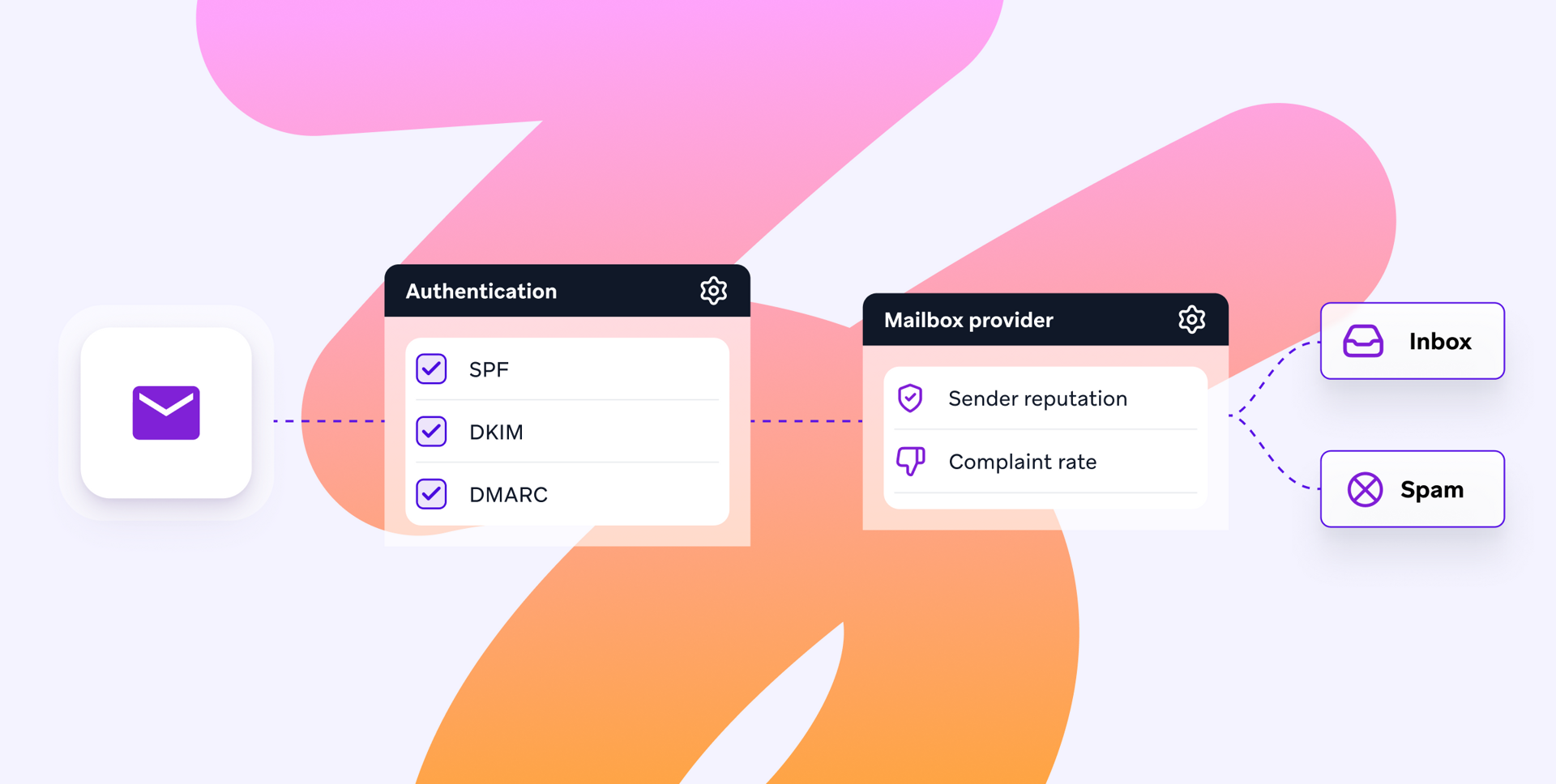
Here’s what determines inbox placement:
Sender reputation: A score given to your sending domain and IP, determined by how recipients have responded to you over time. Domain reputation follows you between platforms, but IP reputation doesn’t, so a migration can mean you start from scratch with IP. Almost every platform offers both a shared pool and a dedicated IP. Shared pools suit smaller senders and dedicated IPs suit larger ones, but most brands end up using both as they grow. Ask any vendor what volume they require before offering a dedicated IP and IP warming, and who runs the warming when you move. A new IP has no history, so volume has to be raised gradually over a few weeks while placement is watched. Some platforms leave this to you, others run it themselves and adjust as results come in.
Authentication: This is proof that you are who you say you are. SPF lists the servers allowed to send on your behalf, DKIM adds a signature that shows the message wasn't altered in transit, and DMARC tells mailbox providers what to do with anything that fails those checks. Your email needs all three or it is treated as suspicious. Since early 2024, this has been a condition of delivery. As of August 2026 Google, Yahoo and Microsoft require it from anyone sending more than 5,000 messages a day to personal accounts, and Google and Yahoo add a one-click unsubscribe and a spam complaint rate below 0.3%. As this is an essential, not desirable, every platform supports it, but they differ on how much they do for you. Some configure records and monitor them, others hand you DNS entries and leave the rest to your IT team, so the platform you choose will need to be one that gives you the level of support you need.
List hygiene: This is what you do with addresses that no longer work. Every hard bounce, dormant subscriber and abandoned inbox you keep sending emails to counts against you. Mailbox providers read it as a sign you aren’t paying attention to who is on your list. Providers use abandoned accounts as spam traps specifically to catch senders who never clean their lists. Some platforms do the work automatically for you here, others leave the cleaning to you.
Engagement signals: Opens, clicks, replies and messages being deleted without being read all show how engaged your audience is with your emails. Sending to people who never engage shows an email provider that you don’t have active subscribers. This is also why a smaller, active list performs better than a large, indifferent one. Some platforms connect to Google Postmaster Tools and Microsoft SNDS and show placement and reputation, but others require you to buy a separate tool on top of the platform to be able to view this data.
Complaint rates: This is how often you are marked as spam by your recipients. Google advises staying below 0.1% but treats 0.3% as the threshold. If you hit this, and ask for help or an investigation, Google won’t engage with you until you bring that percentage down and hold it under 0.3% for seven consecutive days. If you make it hard for people to unsubscribe, that percentage is likely to go up because people will report mail they can’t easily stop and sustained complaints put you at risk of blocklisting. This can happen to careful senders too, and some platforms have help pages for it, others have deliverability specialists who investigate, diagnose the cause and handle the delisting for you. You’ll need to decide which level of help you’d prefer.
To make sure you get the right platform for your needs, ask the vendor the deliverability questions during evaluation:
What’s the warming plan for migration?
Not a description of warming but the actual schedule they’d run for you, with clarity of who does what at each stage.
What does deliverability reporting look like?
Ask for a live account rather than a screenshot. You’re looking for inbox placement, sender reputation, bounce classification and complaint rates in one place and connections to Google Postmaster Tools, Microsoft SNDS and Yahoo’s Complaint Feedback Loop.
What’s included and what costs extra?
Spam testing, inbox placement testing and dedicated IPs are sold separately by some vendors and bundled together by others.
What happens when a domain gets listed?
Ask who investigates, who contacts the blocklist operator and how quickly that process starts. Logging a support ticket and having a deliverability specialist are different products.
What happened the last time the rules changed?
Mailbox provider requirements shift regularly. Ask what the vendor did for customers when Microsoft’s rules landed and how much notice they gave. It’s helpful to know if they are watching the ecosystem on your behalf or waiting for you to notice any changes to email deliverability.
Email marketing platforms by industry
There’s no right platform for a particular industry. The platform that best suits your business depends more on your email program and daily needs than anything else. Here’s a closer look at how Braze has been implemented across different industries and company sizes, providing solutions for a range of challenges.
Email marketing platforms for ecommerce and retail
Email for retail and ecommerce brands has to react to browsing behavior while the intent of the shopper is still live. That means the platform needs product data flowing in real-time as it happens, rather than nightly updates.
Grove Collaborative, the online shopping platform, replaced a legacy platform after it crashed on Thanksgiving Eve. Using the native Shopify integration, they built a browse abandon campaign that sends personalized reminders with product recommendations when a session ends without a purchase.
It produced a 10% checkout rate, a 41% add to cart rate and a 3% click-through rate, the highest they'd achieved on a triggered email. The whole thing was live within a month of integrating Shopify with Braze.
Email marketing platforms for media and entertainment
Media and entertainment brands are often judged on retention, so the work revolves around keeping people engaged and moving through subscription levels where that’s an option. A platform has to pull viewing behavior into the email itself, and let you hold part of the audience back so you can tell whether the email did anything.
Peacock, a leading streaming service, wanted to reduce churn, mark individual subscribers' viewing milestones, nudge free users toward a paid plan and build excitement for the year ahead. They used Braze Alloys partners mParticle and Movable Ink, to build a personalized year-in-review email showing each subscriber the month they watched most, their most-streamed day of the week, the genres they favored and the length of their biggest binge. Four versions covered free and paid tiers, and Liquid personalization populated a dynamic GIF for each person's top month. Measured against a control group held out of the send, recipients showed a 20% lower churn rate over 30 days, a 6% higher upgrade rate from free to paid and a two-point lift in return rate.
DraftKings, a leader in sports entertainment, had a different problem. Their email templates rendered poorly in dark mode and on mobile, and fixing that each time was slow enough to be affecting engagement. Working with Braze Email Creative Services, a managed team that builds HTML templates, they rebuilt their template set to adjust automatically for dark mode and scale properly on mobile, with a drag-and-drop interface that removed the need for external HTML contractors. Campaign creators saved four to five hours a week each.
Email marketing platforms for food service and delivery
You can’t know when someone is hungry, but you can know when they usually open an app and order food. This behavior can be used to speak to customers when they’re most likely to engage. That means a platform that sets send times per person rather than per campaign, and keeps adjusting as habits change is best.
foodora, a food delivery service operating in more than 700 European cities, had been running on several platforms that couldn't tell them much about individual behavior, so messages went out at fixed times chosen for the whole campaign. They moved to Braze and started testing Intelligent Timing, which sends to each customer at the point they're most likely to engage. As more data was gathered they rolled it out to other markets and added more channels alongside email. The conversion rate from messages sent was 41% and they saw a 26% reduction in unsubscribes.
Email marketing platforms for financial services
Financial services email runs under consent rules, regulatory constraints and long product cycles, with brand and accessibility standards that every message has to meet. A platform has to be designed to enable customers to include those standards into the templates and respect consent at the point of sending, so compliance isn't a manual check before every campaign.
Legal & General, a FTSE 100 group founded in 1836, had accumulated a sprawl of legacy infrastructure, siloed CRM platforms and manual workflows that ran on batch processing. That meant slow, generic communication for customers making decisions about pensions, protection and retirement. They rebuilt the foundation with Braze and Tealium, replacing static data with real-time profiles that update as customers act.
For the email team the gain was speed. Templates hold the brand and accessibility standards so nobody rechecks them each time, marketers handle personalization themselves in the editor, and work no longer bottlenecks through one team. Engagement rose 30% and meaningful actions from email activity rose 220%.
Email marketing platforms for travel and hospitality
Travel brands sell to people in dozens of countries who speak different languages and travel for different reasons. One email in one language, sent to everyone, will be wrong for most of them. A platform has to produce a lot of variants without a lot of people, with checkpoints so humans can check what’s going out before it sends.
Dayuse books daytime hotel access across 30 countries with a CRM team of three. Their repeat bookings and abandoned cart emails said the same thing to everyone, and a team that size was never going to write enough versions by hand. They tried wiring ChatGPT in through a webhook, which produced good results but broke often and left them unable to see what was going out. Switching to BrazeAI Agent Console™ moved the agents inside Canvas as journey steps, so each email is written from that person's wish-listed hotels, booking history and language, and the team can read what the agent wrote before it sends. The abandoned cart campaign doubled incremental revenue against the control, and the move off the webhook added another 23% on repeat bookings.
Email marketing platforms for subscription services
Some subscribers sign up for one thing and leave when it's over. A tournament, a series, a launch offer. Getting them back means knowing what they watched and what might bring them in again. That data usually sits in a warehouse, so a platform has to reach it and segment on it without an engineering project each time.
Dyn Media, a European sports platform, picked up a lot of monthly subscribers during the 2024 European Handball Championship and lost half of them within a month. They also had annual subscribers from a launch promotion coming up for renewal.
By connecting Snowflake to Braze, they could segment on what people had actually watched and whether their subscription was still running. The win-back emails were A/B tested and argued for staying past the tournament. The extension emails gave each customer their own voucher code and went out over several days rather than in one hit. Win-back brought back 10% of lapsed subscribers. The extension campaign hit an 80% open rate, and 75% of the people it targeted extended.
Choosing the best email marketing tools by company size
What you need from an email platform is going to change as your company grows. These examples show what small, growth-stage and large enterprise teams should look for.
Small teams
With one or two people running everything, the platform has to let a marketer build, personalize and send without waiting on a developer. Free tiers and low entry prices are real options here, but check the send caps rather than the contact limits, as you’ll hit those first.
Cleo, a family care platform, wanted a welcome series personalized to each member's situation. The strategy was there; what was missing was someone to write the Liquid code behind multi-attribute logic. Their lifecycle email marketing manager used BrazeAI Operator™ to write and debug it inside the dashboard, catching problems that would otherwise have shown up at QA. Unsubscribes fell 81%, and opt-outs on the first email dropped 97%.
Growth-stage teams
If your list has outgrown a shared IP pool, deliverability starts needing attention and the team is being asked to grow retention with no additional budget, then you’re in the growth stage. Managed IP warming and automatic bounce classification help take some of the pressure of maintenance off the team. Personalization becomes even more important as the differences between segments and individuals will increase.
Picklebet, an Australian sports betting app, set out to grow retention without buying it through promotional offers. They personalized offers to individual preferences, using email for longer-form and less time-sensitive messages alongside their other channels. Sessions per user rose 116% and retention rose 13%.
Enterprise email marketing platforms
An enterprise email marketing platform has to support separate creative, operations and analytics functions working on the same program at once. That means approval workflows, reusable content that updates everywhere, role-based permissions, and data that analytics teams can query directly rather than exporting. Migration also becomes a big job, so onboarding support and how the vendor handles the change are really important.
Central Retail, a Thai conglomerate whose brands include Guess, Wrangler and Crocs, moved seven business units and 250 campaigns onto Braze in under two months, working to a phased plan agreed with the Braze onboarding team. They sent 97.5 million messages in the first two months, and 382 million across 2,750 active Canvases since.
When email-only is the right answer, and when it isn't
For a lot of businesses, email-only is the right architecture and if you’re following email best practices, it can last well for years. If email drives most of your revenue and your team is small enough that they know every campaign inside out, and your customers are active and engaged with email, rather than opening an app, then it makes perfect sense to focus on an email-only platform. You don’t want to be paying for channels you never switch on.
But when you start to notice signs that you need more, like a second channel being added through a separate tool, or customer data living in silos that don’t sync up, frequency management becoming a manual job or reporting that doesn’t make sense and can’t be attributed across channels, then it’s time to think of the next step.
Choosing a cross-channel marketing platform is a way to bring channel activity, customer data and messaging logic under one roof. A brand on Braze can add channels inside the platform, rather than having to replatform elsewhere. Cross-channel messaging can be explored one channel at a time, without disrupting your current goals or strategy.
See what the Braze email platform looks like against your current send volume, template library and deliverability requirements.